


Our upgrade to Moodle 4.5 has introduced, or enhanced, some key course design and organisational features which may be useful as you continue to develop your Moodle courses.
Listed below are some of the main ones:
- 1. Course Subsections (add a section within a section).
- 2. Adding a New Section
- 3. Faster Course Editing
- 4. Activities and Resources Can Be Added Anywhere
- 5. Course index (Table of contents)
- 6. Modern Text Editing
- 7. Text and media area
- 8. Activity completion
Components for Learning plugin (New)
TinyMCE (now the default editor in Moodle) is a powerful rich-text editor which is available whenever a Tutor edits a Moodle resource or activity.
We have added a new plugin to this editor which adds ready-made educational templates e.g. tips, alerts, quotes, and activity blocks, directly into the text editor.
It provides a visual aid within a Moode course to enhance course navigation and reduce the learners’ cognitive load.
Below is an image showing some of the Contextual Components available. We have added all the components into a Moodle course for you to view. Just click on the link below for the TEL guide which contains the link to the Moodle course.
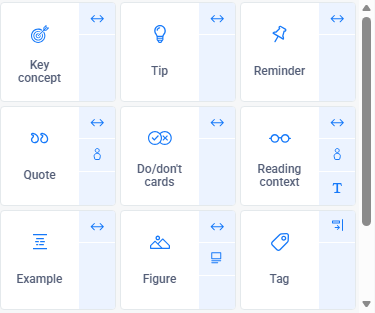
TEL Guide: Components for Learning (C4L)
If you require further guidance please reach out to the TEL team via the IT Support Portal.